
Stocktakes Online — Barcode Datalink
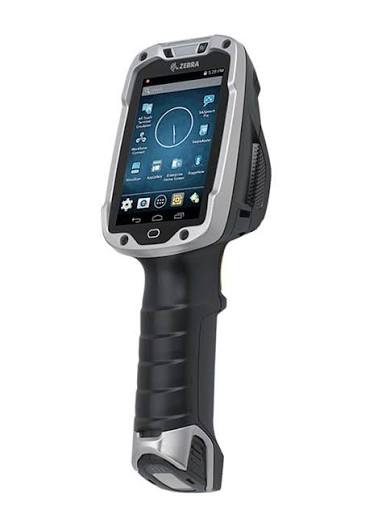
A Zebra TC8000 seen from the front and slightly to one side — a grey and
                  black gun-grip touch computer with a square screen above the handle
Zebra devices  /  Compatibility

Will my Zebras work?

Almost certainly — and older than you would expect. It does not depend on the model, the scan engine, or where you bought them. We have run it on TC8000s from 2015.

Android 5.1 or newer · any Zebra Android device · and one two-minute check
Two minutes

How to check a device.

01

Open the browser on the scanner

Chrome, or whatever browser the device shipped with. Nothing to install and nothing to download — you are not putting the app on it yet.

02

Go to app.stocktakesonline.com.au

The portal's own sign-in page. You do not need an account to load it, and typing nothing into it changes nothing.

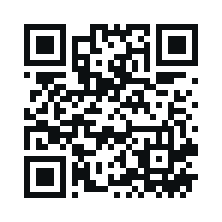
Or save the typing: tap the address bar on the scanner and read this off the monitor. A scan is typed into whatever has focus, and the Enter that follows one loads the page.

QR code holding the address app.stocktakesonline.com.au

Needs a 2D imager. A printable sheet with an ordinary barcode is here for older scanners that read lines only.

03

If the login page appears, the app will run on that scanner

That is the whole test. The hard part on an older device is not the app — it is whether the device still recognises the security certificate the portal uses, from a list built into it when it was made and never updated since. The browser checks exactly that.

If it will not load, the app would install and then refuse to sign in, and no update from us can change that. Ring us on 0414 53 53 95 with the model and we will tell you where you stand.

The version rule underneath it all: Android 5.1 or newer will install. Older than that and the device refuses it outright — not slowly, not with bugs, which is at least an honest failure and not one discovered on the morning of a count.

If yours are older

An old Zebra is often only an update away.

Zebra ships operating system upgrades for its enterprise devices for years after purchase, and a great many scanners in the field are still running whatever they shipped with because nobody had a reason to update them. Ask us, or your Zebra reseller, what the highest version your model supports is — it is frequently higher than what is on the device today.

Ask before you replace

Replacing a fleet because of a software requirement is an expensive answer to a question that starts with a free one. Find out what your models can run first — we would rather tell you that than sell you devices you did not need.

You do not need all of them

Counting is licensed by how many scanners work at once. If ten of your thirty devices are current, ten people can count — and the count is no slower for the twenty sitting in the cabinet.

Hire the shortfall

If you are a few devices short for one count, hiring them is almost always cheaper than buying. They arrive staged and configured for your site and go back afterwards. The devices we supply.

The honest test

Do not take our word for it.

Install it on one device and count fifty items in your own store room, free. If it installs and scans, it works — and you will have learned more in ten minutes than any compatibility table could tell you.

Other makes

What if they are not Zebras?

Then the same two-minute check above is still the test, and the answer is probably yes. Honeywell, Datalogic, CipherLab, Intermec — the rule is Android 5.1 or newer, the same as it is for a Zebra.

Why it should just work

There is no Zebra-only machinery in the app. A scan reaches it as typed characters followed by Enter, which is how every industrial scanner is set up out of the box, whoever made it. The app never talks to the scan engine, so it does not care whose engine it is.

Two things that differ

On a Zebra we read the serial number printed on the back, so that is what the reports show. On anything else Android gives us a long code instead, and that is what you will see. And we have not run it on one. Every hour of testing has gone onto Zebra hardware, because that is what we sell and support — so this is the difference between should and have, and you are entitled to know which one you are being told.

Which is the reason the free trial exists. Put it on one device, count fifty items, and you will know in ten minutes — and if it does not work we would genuinely like to hear about it, because nobody has told us yet either way.

Send us your model numbers.

The part numbers off the back of a few devices, or an export from your management console. We will tell you which will run it and which will not, and which of the ones that will not can be brought up to date.

Ask us